Mission Possible Activity List B
1. Pray for a family history experience, the desire to be engaged in the work, or to know where to start in your family history efforts, etc.
2. Log on to Familysearch.org and explore or set up an account (for those 8 years to 12 years or 13 and older). Return and explore as often as desired to become familiar with the site. If you need your membership number you can contact Brother Steven Sonntag, ward membership clerk, at (801)403-2422.
3. Download Family Tree App on your iPhone or Android phone and explore your tree on the Family Tree app. (If you are just discovering this app for the first time repeat this exploring options as desired to become familiar with the site.
4. Call a temple and family history consultant for help. Ward consultants are listed under Help in FamilySearch, or call the Pitchfords (Michelle - (801)556-2695 or Keith - (801)556-2812).
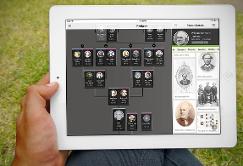
5. Write or record how COVID 19 has changed your life and lessons you have learned during these months of the pandemic. Attach this to the “Memories” section of your personal page in FamilySearch.
6. Spend time with your child (younger or older) or with a sibling helping them complete their family history challenge this month.
7. Share a story from your own childhood with your children or grandchildren.
8. Write down the story you shared with your child or grandchild and attach it to you own “Memories” section on your page on Familysearch.org. If you do not have a child, write down a story, an important event in your life, or your testimony to share with your future family whether it be a child or a niece or nephew.
9. Cook/bake a traditional food from the home country of your ancestors.
10. Keep a journal for 2 weeks – how often you write during those two weeks is up to you.
11. Find a picture of your parents’ wedding day. Attach it to “Memories” on their page using FamilySearch.org or the FamilyTree App
12. Make a favorite family recipe. Attach the recipe to “Memories” and share why it a family favorite
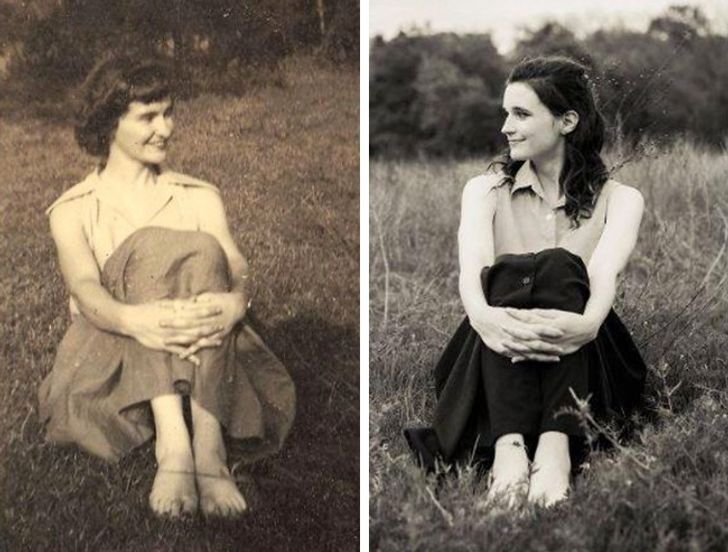
13. Create a “Then and Now” photo. Try to recreate the photo – same hairstyle, clothing, positions etc.
14. Plan a family history trip to one or more of your ancestors’ places of birth (while you may need to make taking the trip a long-term goal, you can dream and plan now).
15. Take a trip in Google Maps to the neighborhoods of your ancestors. (Determine if their homes still stand, are the churches they attended still standing, etc.)
16. Visit a cemetery where ancestors are buried. Take a photo of the headstone and attach it to the person’s “Memories” section on Familysearch.org or using the Family Tree App on your phone
17. Use “Map My Ancestors” in the FamilyTree App to take a road trip to significant places where your ancestors were born, married, lived, died or were buried.
* For activities 18-23 - Note that you may need to sign in to your family Search account to access games and activities at fhtl.byu.edu
18. Find famous people and church leaders you are related to using “Relative Finder” on fhtl.byu.edu
19. Using fhtl.byu.edu go to Pedigree Pie — see your international heritage in a easy to read chart.
20. On fhtl.byu.edu go to Family Calendar — see what happened on this day in your family’s history. It is preset on 4 generations open it to 8 for even more events.
21. On fhtl.byu.edu play Geneopardy — play by yourself or with family (You can use one of the children’s accounts if playing as a family to see both parents’ family lines.)

24. Watch COCO and discuss ways you remember your family.
25. On the gospel library app go to temple and family history then select inspirational resources. Watch “Promised Blessings of Family History”
26. On the gospel library app go to temple and family history then select inspirational resources. Watch “Their Hearts Are Bound To You”
27. On the gospel library app go to temple and family history then select inspirational resources. Watch “A Voice Said, ‘I Am Not a Son.”
28. On the gospel library app go to temple and family history then select inspirational resources. Watch “Redeeming the Dead Redeemed Me.”
29. Learn how to use “Ordinances Ready” (must be signed in to access). Print out a family ordinance card so you are ready when the opportunity is available to go to the temple.
30. Learn how to see what your relationship is to a deceased family member (hint: a View My Relationship link shows up in the header for each person in FamilySearch). BONUS: opt in to allow relatives to see how they are related to you when using View My Relationship.
31. Learn how to retrieve messages and notifications from FamilySearch
32. From the gospel library app go to temple and family history then to family history activities. Click on the blue “All About Me” link – choose at least 5 areas to explore to learn about what was happening in the world the year you were born.
33. If you had to choose one picture to represent each year of your life, which photos would you choose? Share why you chose these photos with family or a friend and perhaps add the photo and reason to “Memories” on your FamilySearch page.
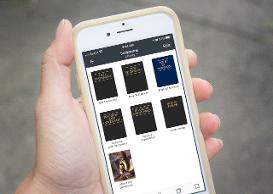
34. Learn to index.
36. Assist in the ‘Improve Place- Names’ project
37. Find your Doppelgänger. See what relative you most look like by using Compare-a-Face (Must sign in to access).
38. Attach a record hint
39. If you already have a FamilySearch account set up a free account with one of the partner sites - My Heritage, Ancestry, Find My Past, Geneanet. (Remember: a basic account for each of these services is free for members of The Church of Jesus Christ of Latter-Day Saints).
40. Print a 4 Generation (or more) Fan Chart.
41. Learn how to do descendancy research.
42. In the Sources tab in FamilySearch.org or the Family Tree App, find an ancestor who was an adult in 1920 or 1930 and review the 1920 or 1930 census to discover what their occupation was.
45. Set a goal to attend the temple to perform ordinances for your ancestors or other relatives (cousins).
46. Prepare for and obtain a temple recommend to attend the temple.

48. Share your experience with Mission ImPossible with family and ward members on the Bluffdale 15th Ward Facebook page or using other social media that you use.